> ## Documentation Index
> Fetch the complete documentation index at: https://help.draftable.com/llms.txt
> Use this file to discover all available pages before exploring further.
# Release Notes: Draftable Clean - June 2026 (v26.6.100)
> Draftable Clean v26.6.100 refreshes the desktop file list, expands Group Policy for enterprise admins, improves NetDocuments integration, and adds hyperlink cleaning for Word documents. For a full list of items in all releases, please see our [Release Log.](/hc/en-us/Draftable-Clean-articles/Release-logs-and-notes/Release-Log-Draftable-Clean)
Draftable Clean v26.6.100 focuses on a clearer desktop experience, stronger enterprise configuration through Group Policy, and tighter DMS integration — plus hyperlink support for Word documents.
Here are the five key features in this release:
* **Redesigned file list** — Profile, **Convert**, and Search move to the top bar, with per-file drag handles and inline quick actions for faster batch workflows
* **Expanded Group Policy template** — admins can enable iManage and NetDocuments, set server URLs and automatic sign-in, pre-accept Terms & Conditions, and configure telemetry without hand-editing the registry
* **NetDocuments identity fix** — Draftable Clean now appears as itself in NetDocuments instead of Draftable Compare, reducing unexpected re-authentication when loading files
* **Organisation-level telemetry tagging** — administrators can supply an organization identifier (GUID) via Group Policy so usage data can be attributed at the organisation level without personal information
* **Hyperlinks in Word documents** — hyperlinks in `.docx` files are detected during scan and can be preserved or removed according to your cleaning profile
***A note from our product team***
Draftable Clean has been built from the ground up based on feedback from our customers. We would love to hear from you as we continue to develop this product.
If you have feature ideas or product performance feedback, please share any suggestions with us by contacting [product@draftable.com](mailto:product@draftable.com).
## Ease of Use
### Redesigned file list
The desktop application's file list has been refreshed for a cleaner, more efficient workflow. **Profile**, **Convert**, and **Search** now sit in the **top bar** alongside your DMS and Clean actions, making batch operations easier to find.
Each file row includes a **drag handle** for reordering, **inline profile selection**, a per-file **PDF icon** for flagging conversion (the icon turns blue when flagged), and updated remove controls. The active profile for your selection is also shown in the status area at the bottom of the window.
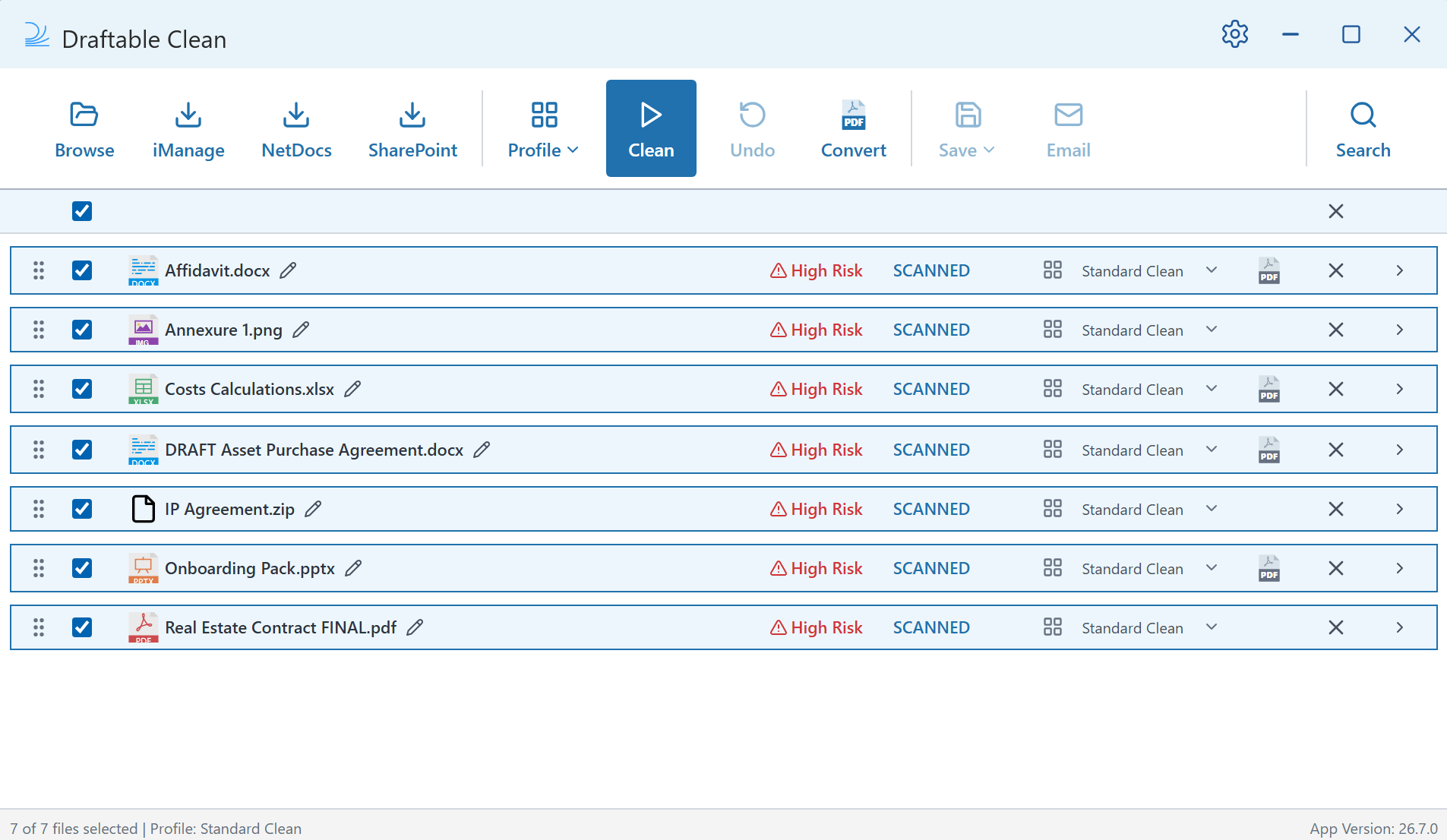 A few controls have moved compared to earlier versions — notably **Convert** and **Search** — so you may need a moment to reorient if you are used to the previous layout.
## Admin Configuration
### Expanded Group Policy template
Several settings that Draftable Clean already supported via registry are now exposed in the **Group Policy (ADMX/ADML) template**, matching the experience administrators expect from Draftable Desktop (Compare).
Newly surfaced policies include:
* **iManage** — enable integration, set the server URL, and configure automatic sign-in
* **NetDocuments** — enable integration and configure automatic check-in
* **Terms & Conditions** — pre-accept for silent or managed rollouts
* **Telemetry** — configure statistics acknowledgement centrally
IT teams can configure these options through Group Policy Editor using clear, documented policy names — without distributing raw registry keys to end users.
### Organisation-level telemetry tagging
Administrators can now configure an **organization identifier** (GUID) via Group Policy. When set, this value is included in Draftable Clean telemetry events, enabling **organisation-level attribution** with **no user-level personal information**.
The setting follows the same pattern as Draftable Desktop (Compare): it is policy-controlled only and is not exposed in the end-user Settings UI. When the policy is unset, telemetry behaviour is unchanged.
## Integrations
### NetDocuments application identity
Draftable Clean previously reused the NetDocuments application identity associated with Draftable Compare, which could cause the integration to appear as **Draftable Compare** and prompt users to sign in again when adding files.
v26.6.100 registers Draftable Clean with its **own NetDocuments application identity**, so the integration is correctly labelled throughout the NetDocuments flow and sign-in is more consistent when loading documents for cleaning.
## Core Functionality
### Hyperlinks in Word documents
Draftable Clean now detects **hyperlinks** in Word (`.docx`) documents during scan. Hyperlinks may point to internal or sensitive URLs, so they appear in the review workflow alongside other metadata types and can be **preserved** or **removed** according to your active cleaning profile.
If you ever need help troubleshooting issues with Draftable Clean, please reach out to [support@draftable.com](mailto:support@draftable.com).
A few controls have moved compared to earlier versions — notably **Convert** and **Search** — so you may need a moment to reorient if you are used to the previous layout.
## Admin Configuration
### Expanded Group Policy template
Several settings that Draftable Clean already supported via registry are now exposed in the **Group Policy (ADMX/ADML) template**, matching the experience administrators expect from Draftable Desktop (Compare).
Newly surfaced policies include:
* **iManage** — enable integration, set the server URL, and configure automatic sign-in
* **NetDocuments** — enable integration and configure automatic check-in
* **Terms & Conditions** — pre-accept for silent or managed rollouts
* **Telemetry** — configure statistics acknowledgement centrally
IT teams can configure these options through Group Policy Editor using clear, documented policy names — without distributing raw registry keys to end users.
### Organisation-level telemetry tagging
Administrators can now configure an **organization identifier** (GUID) via Group Policy. When set, this value is included in Draftable Clean telemetry events, enabling **organisation-level attribution** with **no user-level personal information**.
The setting follows the same pattern as Draftable Desktop (Compare): it is policy-controlled only and is not exposed in the end-user Settings UI. When the policy is unset, telemetry behaviour is unchanged.
## Integrations
### NetDocuments application identity
Draftable Clean previously reused the NetDocuments application identity associated with Draftable Compare, which could cause the integration to appear as **Draftable Compare** and prompt users to sign in again when adding files.
v26.6.100 registers Draftable Clean with its **own NetDocuments application identity**, so the integration is correctly labelled throughout the NetDocuments flow and sign-in is more consistent when loading documents for cleaning.
## Core Functionality
### Hyperlinks in Word documents
Draftable Clean now detects **hyperlinks** in Word (`.docx`) documents during scan. Hyperlinks may point to internal or sensitive URLs, so they appear in the review workflow alongside other metadata types and can be **preserved** or **removed** according to your active cleaning profile.
If you ever need help troubleshooting issues with Draftable Clean, please reach out to [support@draftable.com](mailto:support@draftable.com).