> ## Documentation Index
> Fetch the complete documentation index at: https://help.draftable.com/llms.txt
> Use this file to discover all available pages before exploring further.
# API Self-Hosted v3 – User and viewer settings reference
> Every user account on an API Self-Hosted v3 instance is configured through the built-in Django admin dashboard. This reference explains each setting on the user account page – plan limits, white labelling, comparison viewer controls, comparison options and colours – so you can tailor each account to your organisation.
These settings apply to **API Self-Hosted v3**. Each setting is configured per user account from the **admin dashboard** that ships with your instance. Changes take effect for new comparisons created by that account after you save.
## Overview
API Self-Hosted v3 includes a built-in **admin dashboard** (a Django administration site) for managing the user accounts on your instance. Each account has its own settings page, the **Change user** page, where you control:
* The account's identity and access (personal info and permissions)
* The plan limits applied to the account (file size and page limits)
* The API credentials the account uses
* How the comparison viewer looks and behaves for that account (white labelling, viewer controls, comparison options and colours)
Most settings are configured per account, so you can give different accounts different limits, branding or viewer behaviour.
## How to reach the settings page
Sign in to your instance with an administrator account, then open the **admin** dashboard from the menu in the top-left of the home page.
In the admin dashboard, go to the **Users** section. You will see a list of every account on the instance.
Select the account you want to configure. This opens the **Change user** page, where all of the settings below appear.
After editing, scroll to the bottom and click **Save**. Changes apply to comparisons created by that account from that point on.
Many viewer settings only change comparisons created **after** you save. If a setting does not appear to take effect, generate a new comparison to confirm.
## Personal info and permissions
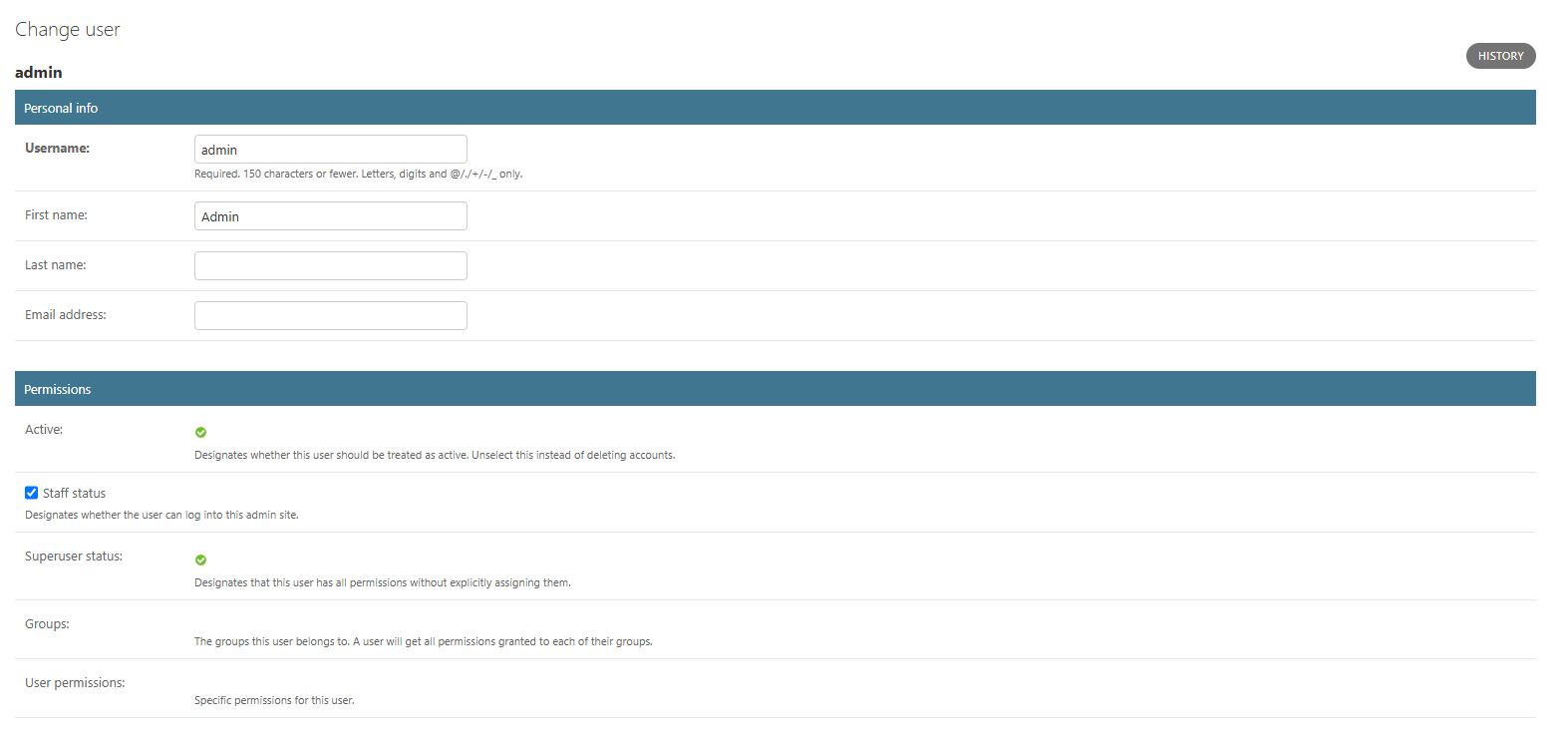 **Personal info**
| Setting | What it does |
| ----------------- | ------------------------------------------------------------------------------------------------------- |
| **Username** | The login name for the account. Required; up to 150 characters; letters, digits and `@ . / + - _` only. |
| **First name** | The account holder's first name. |
| **Last name** | The account holder's last name. |
| **Email address** | The email address for the account. |
**Permissions**
| Setting | What it does |
| -------------------- | ------------------------------------------------------------------------------------------------------------------------------- |
| **Active** | Whether the account is treated as active. Clear this instead of deleting an account to revoke access while keeping its history. |
| **Staff status** | Whether the account can sign in to the admin dashboard. |
| **Superuser status** | Grants the account every permission without assigning them individually. Reserve this for trusted administrators. |
| **Groups** | The permission groups the account belongs to. An account inherits every permission granted to its groups. |
| **User permissions** | Specific permissions granted to this account on top of any group permissions. |
**Superuser** accounts have full control over your instance, including every other account. Grant it only to administrators who need it.
## Plan limits
**Personal info**
| Setting | What it does |
| ----------------- | ------------------------------------------------------------------------------------------------------- |
| **Username** | The login name for the account. Required; up to 150 characters; letters, digits and `@ . / + - _` only. |
| **First name** | The account holder's first name. |
| **Last name** | The account holder's last name. |
| **Email address** | The email address for the account. |
**Permissions**
| Setting | What it does |
| -------------------- | ------------------------------------------------------------------------------------------------------------------------------- |
| **Active** | Whether the account is treated as active. Clear this instead of deleting an account to revoke access while keeping its history. |
| **Staff status** | Whether the account can sign in to the admin dashboard. |
| **Superuser status** | Grants the account every permission without assigning them individually. Reserve this for trusted administrators. |
| **Groups** | The permission groups the account belongs to. An account inherits every permission granted to its groups. |
| **User permissions** | Specific permissions granted to this account on top of any group permissions. |
**Superuser** accounts have full control over your instance, including every other account. Grant it only to administrators who need it.
## Plan limits
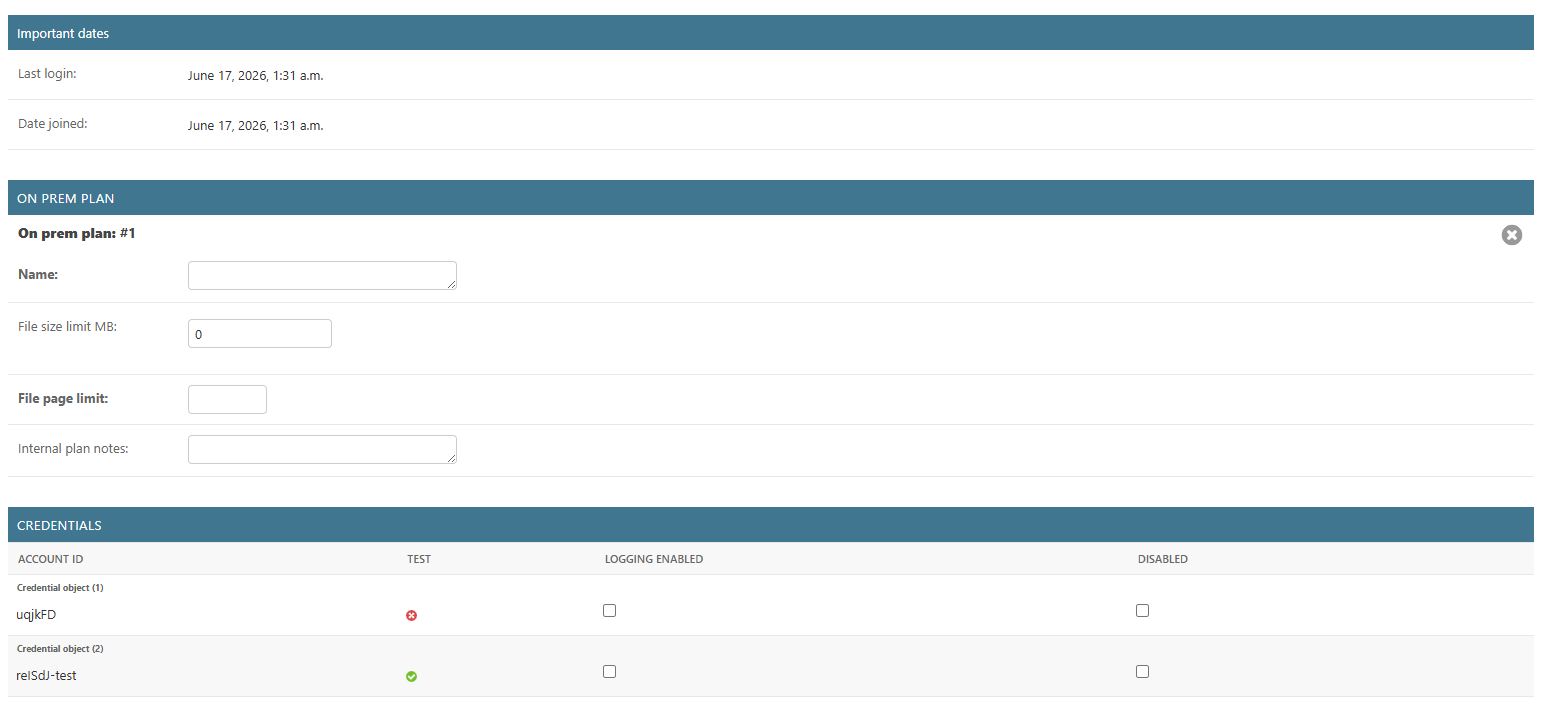 The **Important dates** section (last login and date joined) is read-only.
The **On prem plan** section sets the comparison limits for the account:
| Setting | What it does |
| ----------------------- | ----------------------------------------------------------------------------------------------------------------------------------------------------------------------------------------------------------- |
| **Name** | A label for the plan. This field is for your own reference and does not affect how the instance behaves. |
| **File size limit MB** | The maximum size, in MB, of a single file this account can submit for comparison. A file larger than this limit will be rejected and the comparison will fail. Leave it at `0` to use the instance default. |
| **File page limit** | The maximum number of pages in a single file this account can submit. A file with more pages than this limit will be rejected and the comparison will fail. Leave it blank to use the instance default. |
| **Internal plan notes** | Free-text notes about the account, for your own reference. |
When **File size limit MB** is `0` and **File page limit** is blank, the account uses your instance's default limits. Set explicit values here to raise or lower the limits for an individual account.
**Credentials**
The **Credentials** table lists the API credentials attached to the account. Each credential shows its **Account ID**, whether it is a **test** credential, whether **logging** is enabled, and whether it is **disabled**. Account IDs and the test flag are read-only; you can toggle **Logging enabled** and **Disabled** per credential.
## Comparison viewer settings
The **User options** section controls how the online comparison viewer looks and behaves for the account. These settings let you brand the viewer, show or hide controls, and set the defaults users see when they open a comparison.
### Compare viewer
The **Important dates** section (last login and date joined) is read-only.
The **On prem plan** section sets the comparison limits for the account:
| Setting | What it does |
| ----------------------- | ----------------------------------------------------------------------------------------------------------------------------------------------------------------------------------------------------------- |
| **Name** | A label for the plan. This field is for your own reference and does not affect how the instance behaves. |
| **File size limit MB** | The maximum size, in MB, of a single file this account can submit for comparison. A file larger than this limit will be rejected and the comparison will fail. Leave it at `0` to use the instance default. |
| **File page limit** | The maximum number of pages in a single file this account can submit. A file with more pages than this limit will be rejected and the comparison will fail. Leave it blank to use the instance default. |
| **Internal plan notes** | Free-text notes about the account, for your own reference. |
When **File size limit MB** is `0` and **File page limit** is blank, the account uses your instance's default limits. Set explicit values here to raise or lower the limits for an individual account.
**Credentials**
The **Credentials** table lists the API credentials attached to the account. Each credential shows its **Account ID**, whether it is a **test** credential, whether **logging** is enabled, and whether it is **disabled**. Account IDs and the test flag are read-only; you can toggle **Logging enabled** and **Disabled** per credential.
## Comparison viewer settings
The **User options** section controls how the online comparison viewer looks and behaves for the account. These settings let you brand the viewer, show or hide controls, and set the defaults users see when they open a comparison.
### Compare viewer
 **Compare viewer**
| Setting | What it does |
| ------------------ | ------------------------------------------------------------------------------------------------------------------------------------------------------------------------------------------------- |
| **Viewer version** | The comparison viewer version used for this account. Leave it blank to always use the latest available version. **Viewer version resolved** (read-only) shows the exact version this resolves to. |
**Persistence**
| Setting | What it does |
| -------------------------------- | --------------------------------------------------------------------------------------------------------- |
| **Remember preferences enabled** | When enabled, the viewer remembers a user's preferences (such as view mode and zoom) between comparisons. |
Interested in custom branding for your comparison viewer? Branding options are available as part of a white-labelling package. To discuss white labelling for your instance, contact our sales team at [sales@draftable.com](mailto:sales@draftable.com).
### Viewer controls
**Compare viewer**
| Setting | What it does |
| ------------------ | ------------------------------------------------------------------------------------------------------------------------------------------------------------------------------------------------- |
| **Viewer version** | The comparison viewer version used for this account. Leave it blank to always use the latest available version. **Viewer version resolved** (read-only) shows the exact version this resolves to. |
**Persistence**
| Setting | What it does |
| -------------------------------- | --------------------------------------------------------------------------------------------------------- |
| **Remember preferences enabled** | When enabled, the viewer remembers a user's preferences (such as view mode and zoom) between comparisons. |
Interested in custom branding for your comparison viewer? Branding options are available as part of a white-labelling package. To discuss white labelling for your instance, contact our sales team at [sales@draftable.com](mailto:sales@draftable.com).
### Viewer controls
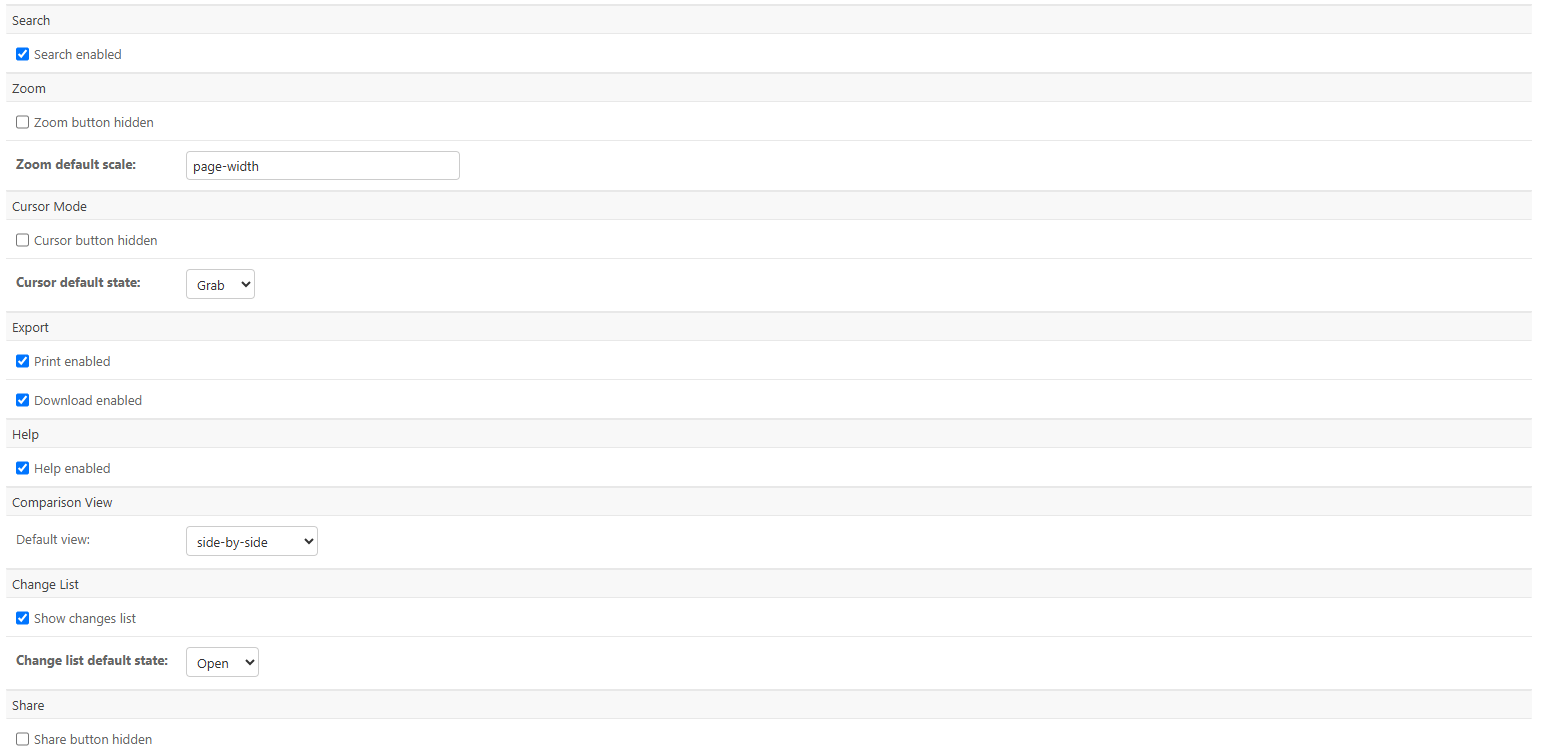 | Setting | What it does |
| ---------------------------------- | -------------------------------------------------------------------------------------------------------------------------------- |
| **Search enabled** | Shows or hides the search button in the viewer. |
| **Zoom button hidden** | When enabled, hides the zoom control. |
| **Zoom default scale** | The default zoom level when a comparison opens. Defaults to `page-width` (other values include `page-fit` or a zoom percentage). |
| **Cursor button hidden** | When enabled, hides the cursor-mode control. |
| **Cursor default state** | The default cursor mode: **Grab** (pan the document) or **Select** (select text). |
| **Print enabled** | Shows or hides the print button. |
| **Download enabled** | Shows or hides the download button. |
| **Help enabled** | Shows or hides the help button. |
| **Comparison view – default view** | The view shown when a comparison opens: **side-by-side** or **single-document**. |
| **Show changes list** | Shows or hides the change list panel. |
| **Change list default state** | Whether the change list starts **Open** or **Closed**. |
| **Share button hidden** | When enabled, hides the share button. |
### Display and comparison options
| Setting | What it does |
| ---------------------------------- | -------------------------------------------------------------------------------------------------------------------------------- |
| **Search enabled** | Shows or hides the search button in the viewer. |
| **Zoom button hidden** | When enabled, hides the zoom control. |
| **Zoom default scale** | The default zoom level when a comparison opens. Defaults to `page-width` (other values include `page-fit` or a zoom percentage). |
| **Cursor button hidden** | When enabled, hides the cursor-mode control. |
| **Cursor default state** | The default cursor mode: **Grab** (pan the document) or **Select** (select text). |
| **Print enabled** | Shows or hides the print button. |
| **Download enabled** | Shows or hides the download button. |
| **Help enabled** | Shows or hides the help button. |
| **Comparison view – default view** | The view shown when a comparison opens: **side-by-side** or **single-document**. |
| **Show changes list** | Shows or hides the change list panel. |
| **Change list default state** | Whether the change list starts **Open** or **Closed**. |
| **Share button hidden** | When enabled, hides the share button. |
### Display and comparison options
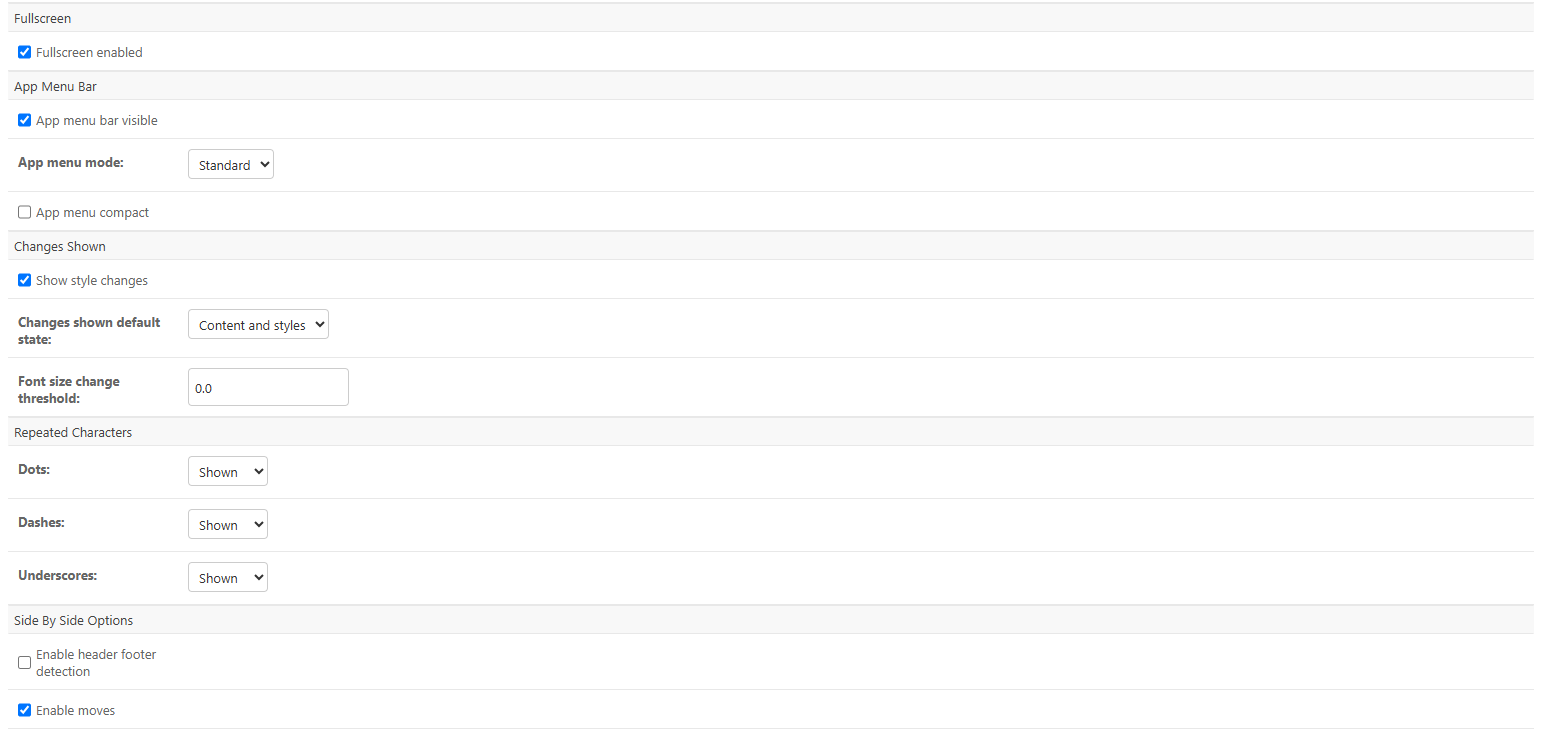 **Fullscreen and app menu bar**
| Setting | What it does |
| ------------------------ | --------------------------------------------------------- |
| **Fullscreen enabled** | Whether the fullscreen option is available in the viewer. |
| **App menu bar visible** | Shows or hides the application menu bar. |
| **App menu mode** | The menu style: **Standard** or **Ribbon**. |
| **App menu compact** | When enabled, displays the menu in a more compact layout. |
**Changes shown**
| Setting | What it does |
| ------------------------------- | --------------------------------------------------------------------------------------------------------------------------------------------------------------------------------------------- |
| **Show style changes** | Whether formatting (style) changes are shown in the comparison. |
| **Changes shown default state** | What is shown by default: **Content and styles**, **Content only**, or **Styles only**. |
| **Font size change threshold** | The minimum font-size difference that counts as a change. For example, set it above `0` so small, document-wide font-size shifts are not flagged. Defaults to `0` (every change is detected). |
**Repeated characters**
Control how runs of repeated **Dots**, **Dashes** and **Underscores** (for example, leader lines in a table of contents) are handled. Each can be set to **Shown**, **Hidden** or **Ignored**.
**Side by side options**
| Setting | What it does |
| ---------------------------------- | ---------------------------------------------------------------------------------------------------------------------- |
| **Enable header footer detection** | When enabled, the comparison detects and accounts for headers and footers. |
| **Enable moves** | When enabled, the comparison detects and marks moved text rather than showing it as a separate deletion and insertion. |
### Colour customizations
**Fullscreen and app menu bar**
| Setting | What it does |
| ------------------------ | --------------------------------------------------------- |
| **Fullscreen enabled** | Whether the fullscreen option is available in the viewer. |
| **App menu bar visible** | Shows or hides the application menu bar. |
| **App menu mode** | The menu style: **Standard** or **Ribbon**. |
| **App menu compact** | When enabled, displays the menu in a more compact layout. |
**Changes shown**
| Setting | What it does |
| ------------------------------- | --------------------------------------------------------------------------------------------------------------------------------------------------------------------------------------------- |
| **Show style changes** | Whether formatting (style) changes are shown in the comparison. |
| **Changes shown default state** | What is shown by default: **Content and styles**, **Content only**, or **Styles only**. |
| **Font size change threshold** | The minimum font-size difference that counts as a change. For example, set it above `0` so small, document-wide font-size shifts are not flagged. Defaults to `0` (every change is detected). |
**Repeated characters**
Control how runs of repeated **Dots**, **Dashes** and **Underscores** (for example, leader lines in a table of contents) are handled. Each can be set to **Shown**, **Hidden** or **Ignored**.
**Side by side options**
| Setting | What it does |
| ---------------------------------- | ---------------------------------------------------------------------------------------------------------------------- |
| **Enable header footer detection** | When enabled, the comparison detects and accounts for headers and footers. |
| **Enable moves** | When enabled, the comparison detects and marks moved text rather than showing it as a separate deletion and insertion. |
### Colour customizations
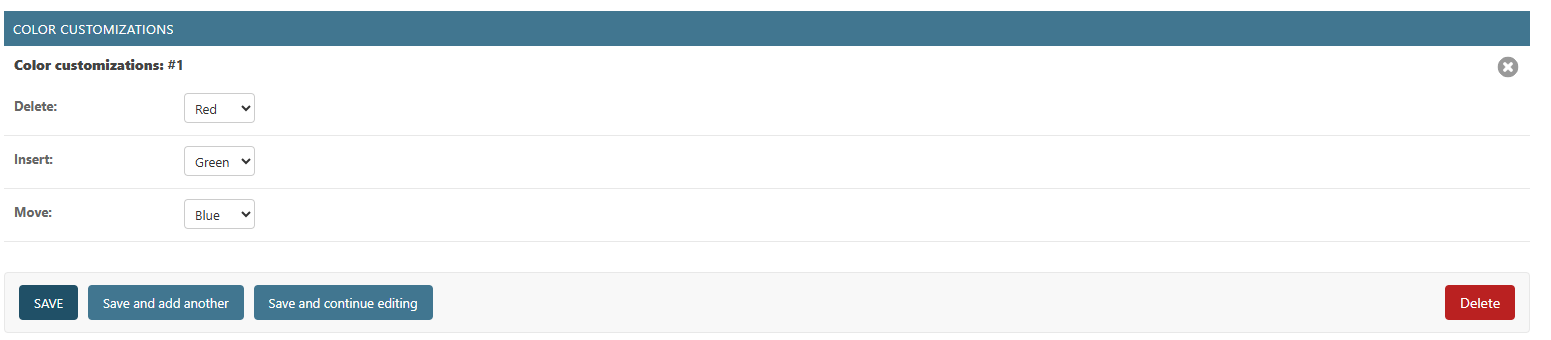 Set the colours used to mark changes in the comparison:
| Setting | What it does |
| ---------- | ------------------------------------------------------- |
| **Delete** | The colour for deleted content. Defaults to **Red**. |
| **Insert** | The colour for inserted content. Defaults to **Green**. |
| **Move** | The colour for moved content. Defaults to **Blue**. |
Available colours are Red, Green, Blue, Yellow, Purple, Grey and None.
## Saving your changes
When you have finished, scroll to the bottom of the page and click **Save**. Use **Save and continue editing** to apply your changes and stay on the page. New settings apply to comparisons created by the account after you save.
**Last updated:** 17 June 2026. Settings reference verified against API Self-Hosted v3.
Set the colours used to mark changes in the comparison:
| Setting | What it does |
| ---------- | ------------------------------------------------------- |
| **Delete** | The colour for deleted content. Defaults to **Red**. |
| **Insert** | The colour for inserted content. Defaults to **Green**. |
| **Move** | The colour for moved content. Defaults to **Blue**. |
Available colours are Red, Green, Blue, Yellow, Purple, Grey and None.
## Saving your changes
When you have finished, scroll to the bottom of the page and click **Save**. Use **Save and continue editing** to apply your changes and stay on the page. New settings apply to comparisons created by the account after you save.
**Last updated:** 17 June 2026. Settings reference verified against API Self-Hosted v3.