> ## Documentation Index
> Fetch the complete documentation index at: https://help.draftable.com/llms.txt
> Use this file to discover all available pages before exploring further.
# Release Notes: Draftable Legal – Early June 2026 (v26.6.0)
> The Early June 2026 release of Draftable Legal (v26.6.0) delivers a fully rebuilt Settings interface, a smarter Compare Selector with auto-pairing and a unified Recent Files picker, optional system-browser sign-in for iManage, headless license activation for administrators, and a range of accuracy and reliability improvements. It also bundles Redline in Email 2.0.0, with undo in the redline preview, automatic add-in updates, and moved-text and reliability fixes. For a full list of items in all releases, please see our [Release Log.](/hc/en-us/articles/20871414263577-Release-Log-Draftable-Legal)
 Here's a quick summary of the five most impactful improvements:
* **Find and understand any setting faster** with a fully rebuilt Settings interface featuring consistent language, clearer labels, and search.
* **Spend less time setting up bulk comparisons** as the Compare Selector now auto-pairs and orders file versions as you import them.
* **Enjoy a consistent experience across every mode** with a unified Recent Files picker in both Single and Bulk modes and a swap-sides button to correct the older/newer order wherever you compare.
* **Sign in to iManage more reliably** with a new option to authenticate in your default browser.
* **Fix a mistake without starting over in Redline in Email** by undoing individual changes in the preview, while admins get automatic add-in updates.
Let's explore these in more detail.
***But first, a note from our product team***
Our product improvements are the direct result of feedback from our customers. We are extremely grateful for the excellent feedback we received which allowed the Early June 2026 release to be possible.
If you have feature ideas or product performance feedback, we would love to hear from you. Please share any suggestions with us by contacting [product@draftable.com](mailto:product@draftable.com).
## Settings
### A fully rebuilt Settings interface
Here's a quick summary of the five most impactful improvements:
* **Find and understand any setting faster** with a fully rebuilt Settings interface featuring consistent language, clearer labels, and search.
* **Spend less time setting up bulk comparisons** as the Compare Selector now auto-pairs and orders file versions as you import them.
* **Enjoy a consistent experience across every mode** with a unified Recent Files picker in both Single and Bulk modes and a swap-sides button to correct the older/newer order wherever you compare.
* **Sign in to iManage more reliably** with a new option to authenticate in your default browser.
* **Fix a mistake without starting over in Redline in Email** by undoing individual changes in the preview, while admins get automatic add-in updates.
Let's explore these in more detail.
***But first, a note from our product team***
Our product improvements are the direct result of feedback from our customers. We are extremely grateful for the excellent feedback we received which allowed the Early June 2026 release to be possible.
If you have feature ideas or product performance feedback, we would love to hear from you. Please share any suggestions with us by contacting [product@draftable.com](mailto:product@draftable.com).
## Settings
### A fully rebuilt Settings interface
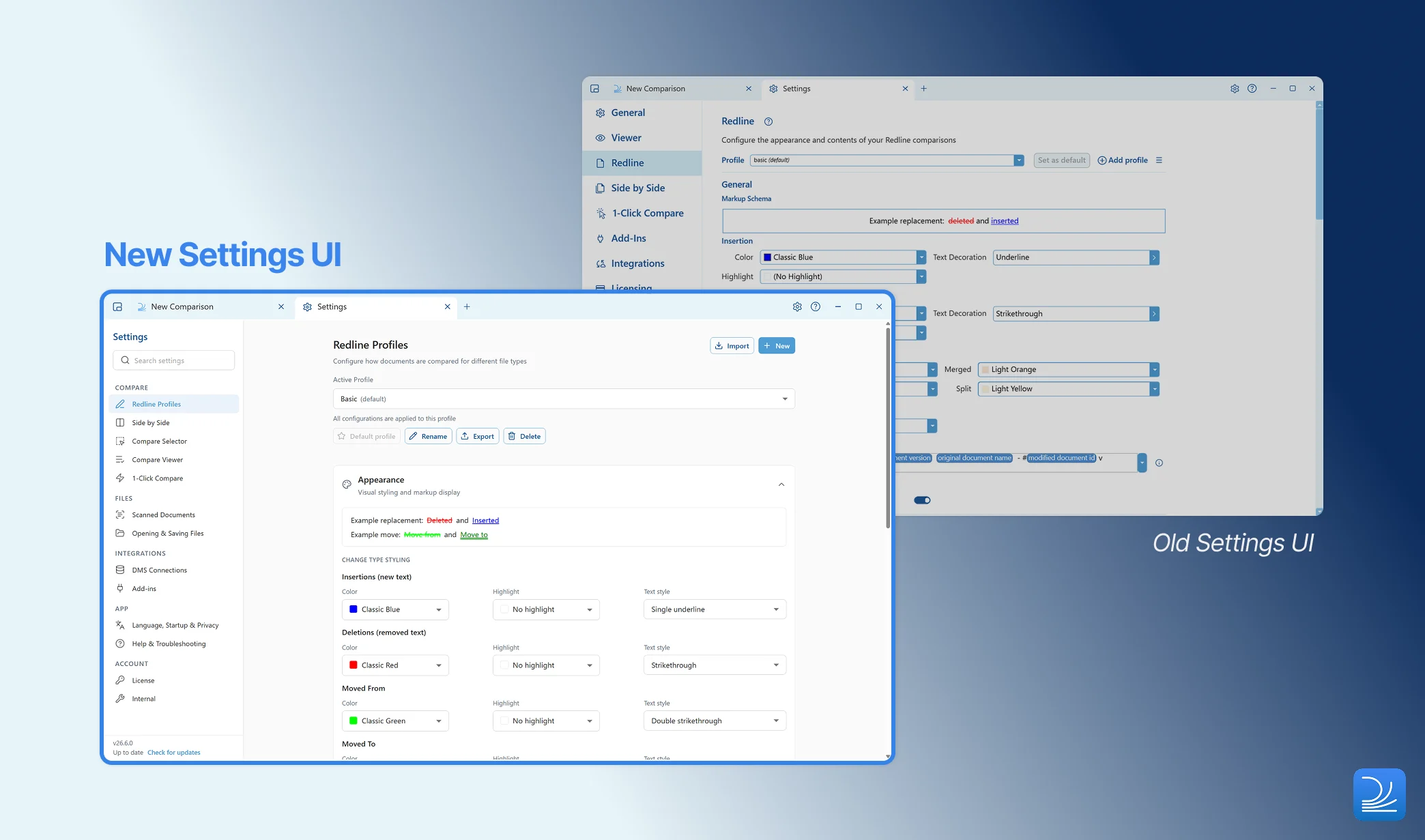 As Draftable Legal has evolved, we've added settings to support user choice. Settings were added over time as needed, which left us with options that weren't always relevant, and items that didn't always sit in the most logical place.
We've rebuilt the Settings interface from the ground up to fix this. Every setting now uses consistent language, and we've added explanations to most labels to they help clarify its intended effect. We've also introduced badges to tell you at a glance whether a setting is **new**, **experimental**, or **controlled by your administrator**.
To make options easier to find, rather than hunting for the right panel, search within Settings now takes you directly to the relevant section heading and its related controls. This makes it much faster to jump straight to a specific option, even in areas of Settings you don't visit often.
Importantly, the new interface reads from the same Group Policy and registry sources as before, so organization-managed values continue to apply unchanged after upgrading.
There are two checks for IT administrators: the removed `AfterCompareSaveDestination` policy, and the supported redline view modes. Please read [our upgrade notice in the Release Log](/hc/en-us/articles/20871414263577-Release-Log-Draftable-Legal) for full details.
## Core Functionality
### Changes Report export restored for PowerPoint and Excel Redline
The Changes Report was superseded in favour of the Departures Table. For formats like Excel and PowerPoint, however, there is no Departures Table, so the Changes Report should never have been removed for these file types. It has now been restored, bringing back the summary output for firms that rely on it when comparing PowerPoint and Excel Redline.
### New keyboard shortcut to start a comparison
You can now press **Ctrl+T** to open a new comparison at any time, giving keyboard-first users a quicker way to begin their next review without reaching for the mouse.
## Compare Selector
### Smarter file pairing and ordering
As Draftable Legal has evolved, we've added settings to support user choice. Settings were added over time as needed, which left us with options that weren't always relevant, and items that didn't always sit in the most logical place.
We've rebuilt the Settings interface from the ground up to fix this. Every setting now uses consistent language, and we've added explanations to most labels to they help clarify its intended effect. We've also introduced badges to tell you at a glance whether a setting is **new**, **experimental**, or **controlled by your administrator**.
To make options easier to find, rather than hunting for the right panel, search within Settings now takes you directly to the relevant section heading and its related controls. This makes it much faster to jump straight to a specific option, even in areas of Settings you don't visit often.
Importantly, the new interface reads from the same Group Policy and registry sources as before, so organization-managed values continue to apply unchanged after upgrading.
There are two checks for IT administrators: the removed `AfterCompareSaveDestination` policy, and the supported redline view modes. Please read [our upgrade notice in the Release Log](/hc/en-us/articles/20871414263577-Release-Log-Draftable-Legal) for full details.
## Core Functionality
### Changes Report export restored for PowerPoint and Excel Redline
The Changes Report was superseded in favour of the Departures Table. For formats like Excel and PowerPoint, however, there is no Departures Table, so the Changes Report should never have been removed for these file types. It has now been restored, bringing back the summary output for firms that rely on it when comparing PowerPoint and Excel Redline.
### New keyboard shortcut to start a comparison
You can now press **Ctrl+T** to open a new comparison at any time, giving keyboard-first users a quicker way to begin their next review without reaching for the mouse.
## Compare Selector
### Smarter file pairing and ordering
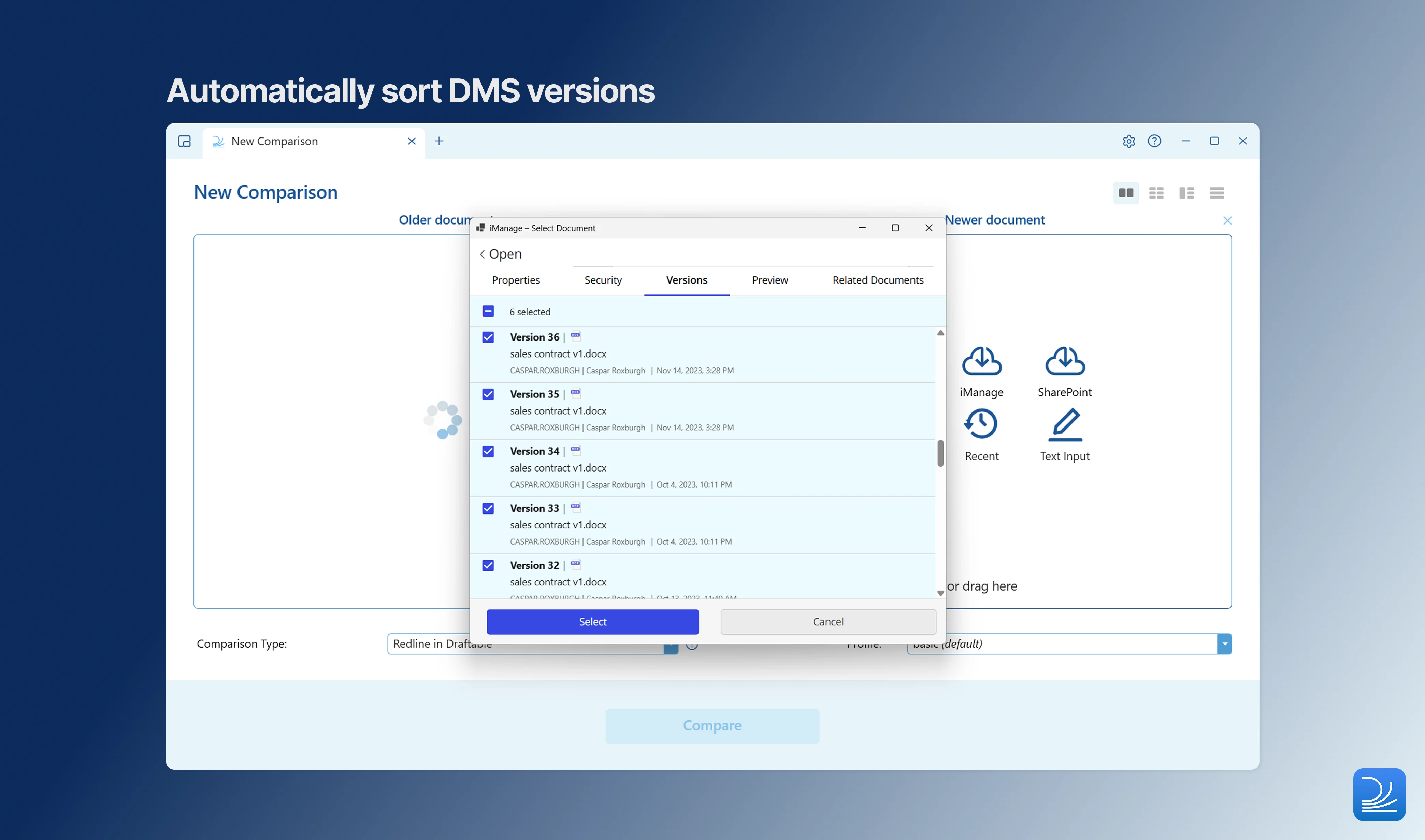 When you import several file versions at once, Draftable now auto-pairs and orders them for you, so they slot into sensible older/newer positions without manual shuffling. Pairing works on DMS versions, and local files using filename, modified date and other information.
This only applies to new items being imported — it does not reorder items already in the selector. For teams working on bulk documents, we expect this to be a significant timesaver.
Turn on 'Smart file ordering' in Settings to enable this functionality.
### Unified Recent Files picker
The Recent Files picker is now consistent across both Single and Bulk modes. Wherever you are setting up a comparison, you have the same quick access to recently used documents across all modes.
### Swap sides and clear all
A swap-sides button is now available in every comparison mode, making it easy to correct the older/newer order regardless of how you are comparing. Single mode also gains a clear-all action to reset your selection in one click.
## Integrations
### Optional system-browser sign-in for iManage
When you import several file versions at once, Draftable now auto-pairs and orders them for you, so they slot into sensible older/newer positions without manual shuffling. Pairing works on DMS versions, and local files using filename, modified date and other information.
This only applies to new items being imported — it does not reorder items already in the selector. For teams working on bulk documents, we expect this to be a significant timesaver.
Turn on 'Smart file ordering' in Settings to enable this functionality.
### Unified Recent Files picker
The Recent Files picker is now consistent across both Single and Bulk modes. Wherever you are setting up a comparison, you have the same quick access to recently used documents across all modes.
### Swap sides and clear all
A swap-sides button is now available in every comparison mode, making it easy to correct the older/newer order regardless of how you are comparing. Single mode also gains a clear-all action to reset your selection in one click.
## Integrations
### Optional system-browser sign-in for iManage
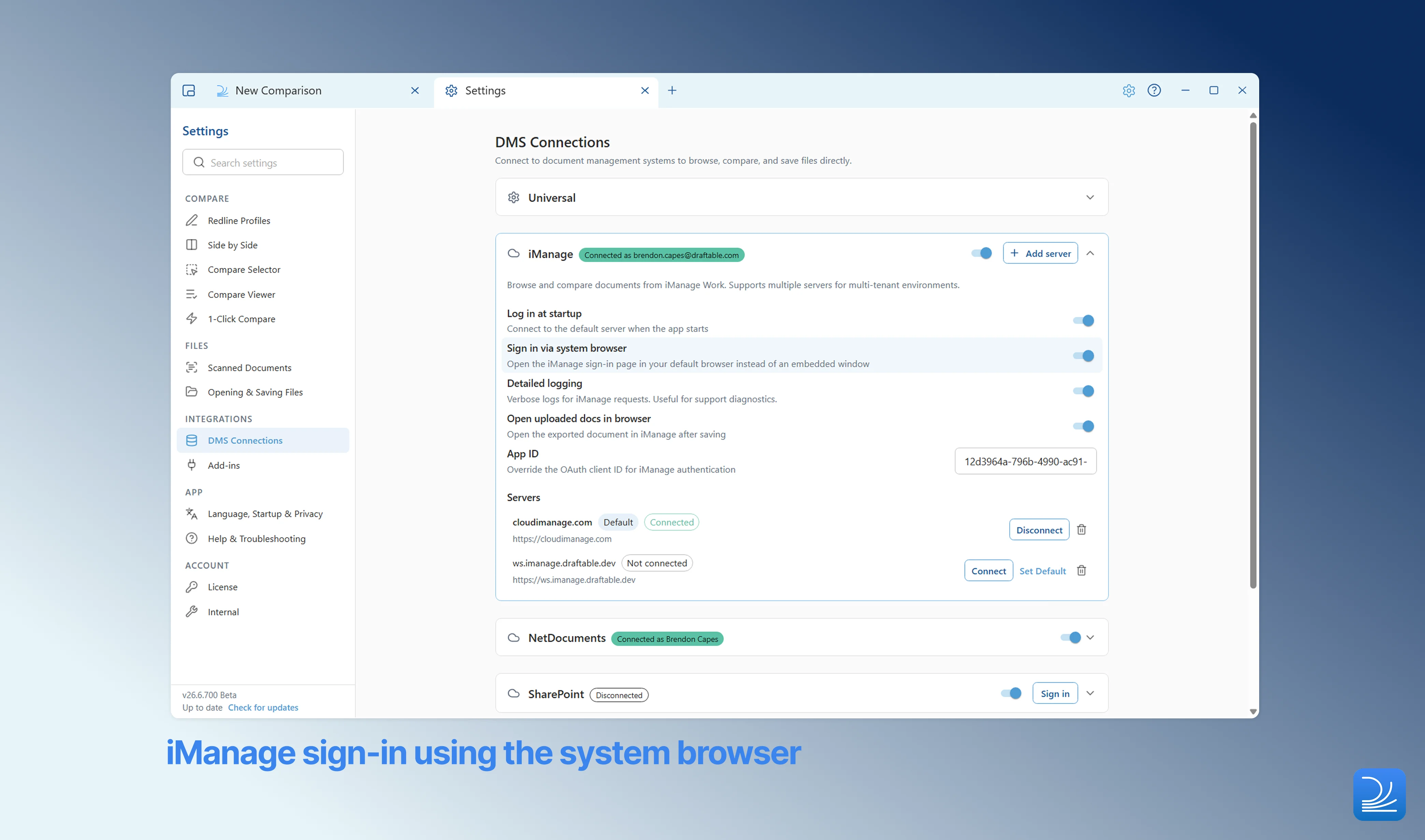 Draftable now offers an optional system-browser sign-in for iManage, as an alternative to the embedded browser. This helps in environments where Microsoft Entra Conditional Access blocks the embedded browser from completing sign-in, allowing authentication to proceed in the user's default browser instead.
The option is lockable via Group Policy, so administrators can standardise the sign-in method across their deployment.
## Redline in Email
This release ships alongside **Redline in Email 2.0.0**, the Outlook add-in that brings Draftable's comparison technology directly into your inbox for live email redlining and accept/reject review.
**Redline in Email 2.0.0 requires Draftable Desktop 26.6.0 or later**. If the add-in is updated ahead of Desktop, comparison is blocked until Desktop is upgraded, so roll out this Desktop release before or alongside the new add-in manifest.
### Undo individual changes in the redline preview
Draftable now offers an optional system-browser sign-in for iManage, as an alternative to the embedded browser. This helps in environments where Microsoft Entra Conditional Access blocks the embedded browser from completing sign-in, allowing authentication to proceed in the user's default browser instead.
The option is lockable via Group Policy, so administrators can standardise the sign-in method across their deployment.
## Redline in Email
This release ships alongside **Redline in Email 2.0.0**, the Outlook add-in that brings Draftable's comparison technology directly into your inbox for live email redlining and accept/reject review.
**Redline in Email 2.0.0 requires Draftable Desktop 26.6.0 or later**. If the add-in is updated ahead of Desktop, comparison is blocked until Desktop is upgraded, so roll out this Desktop release before or alongside the new add-in manifest.
### Undo individual changes in the redline preview
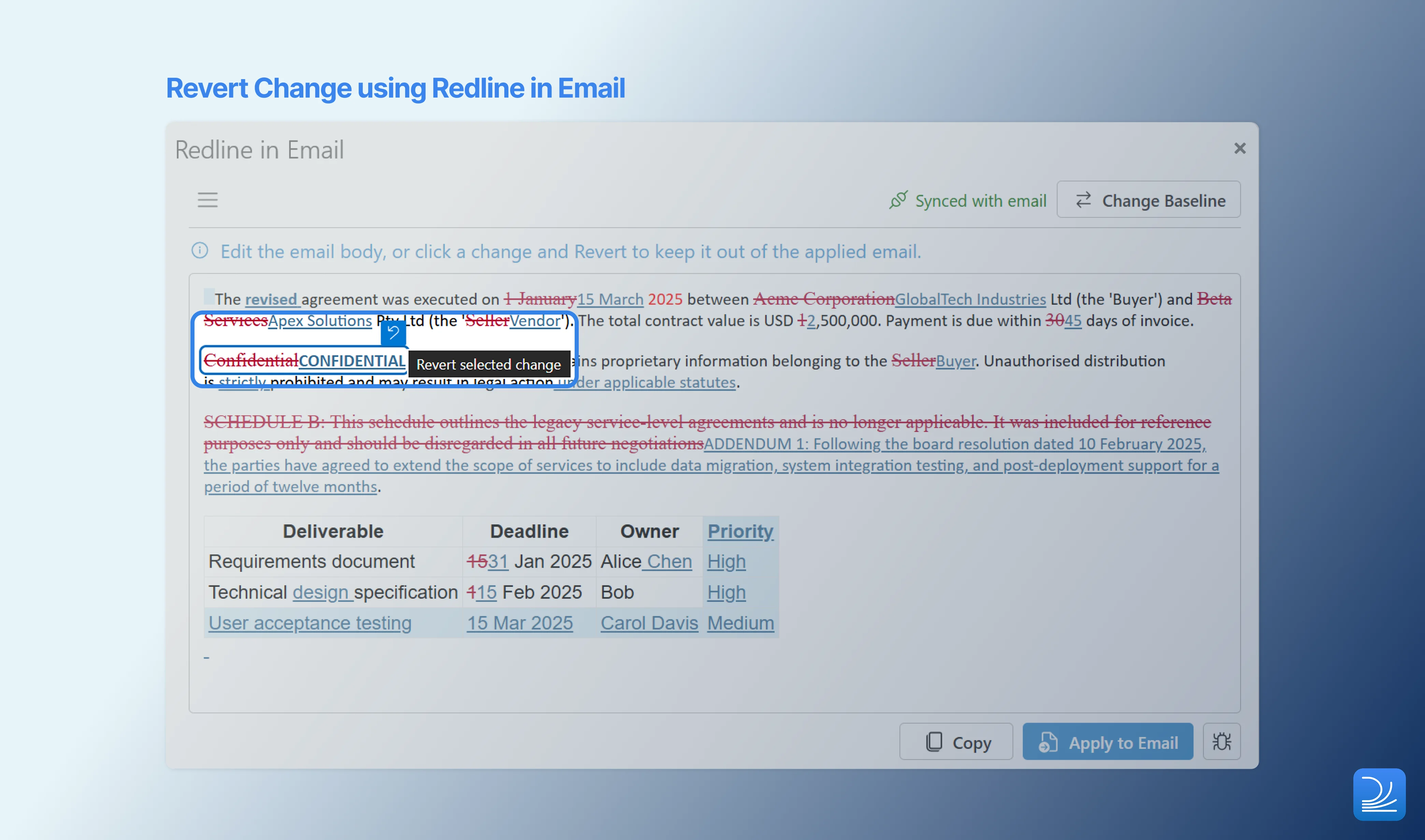 You can now revert an individual change directly from the redline preview before applying it to your email. While reviewing your live redline, if you spot an insertion or deletion you didn't intend, you can undo just that change without starting over. A sync indicator shows that the preview is kept in step with your email body, and you'll be warned if an action such as undo would break that link.
Simply 'Redline my changes' again to re-sync the email.
### Automatic add-in updates for administrators
You can now revert an individual change directly from the redline preview before applying it to your email. While reviewing your live redline, if you spot an insertion or deletion you didn't intend, you can undo just that change without starting over. A sync indicator shows that the preview is kept in step with your email body, and you'll be warned if an action such as undo would break that link.
Simply 'Redline my changes' again to re-sync the email.
### Automatic add-in updates for administrators
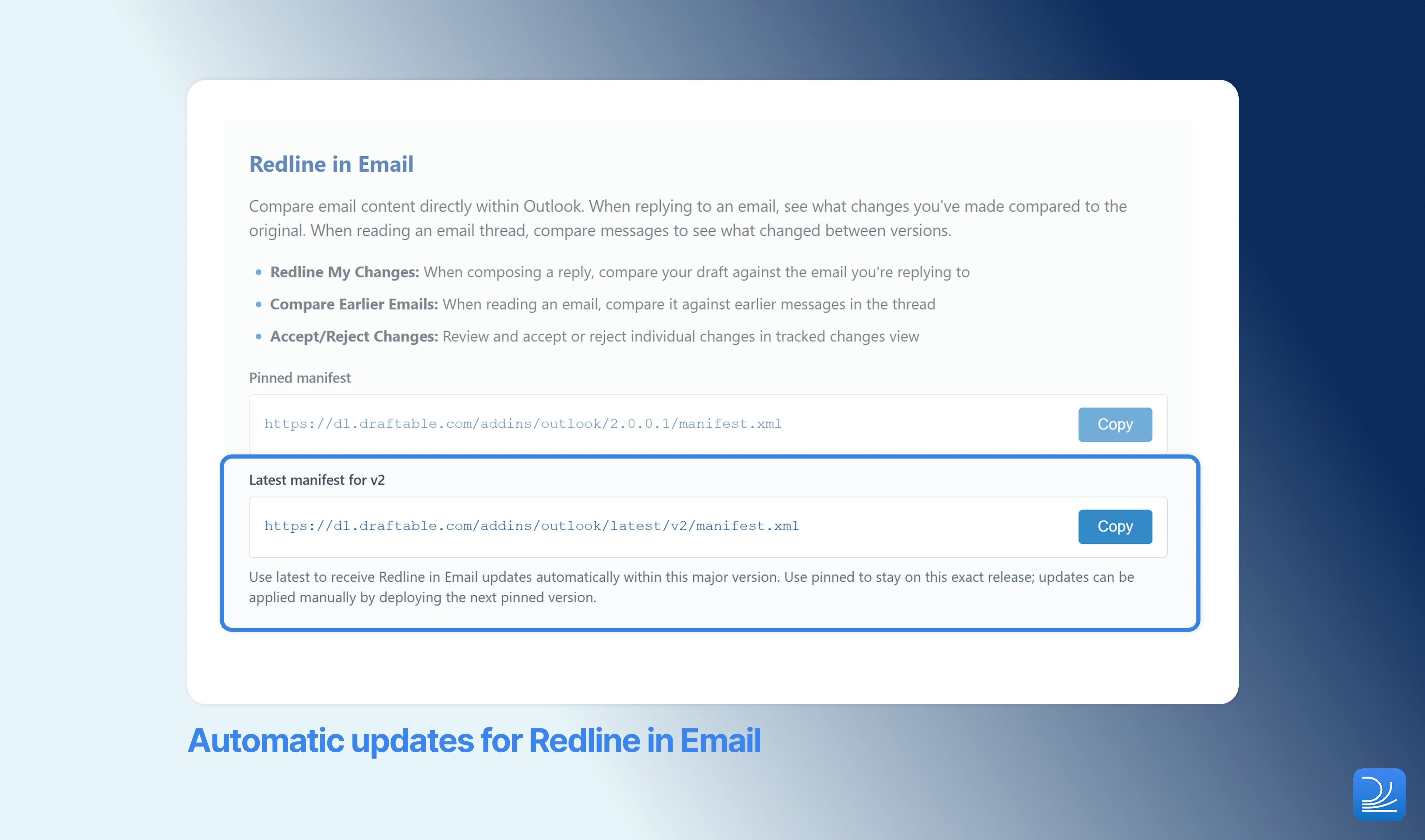 Administrators can now point their Outlook deployment at an auto-updating manifest endpoint that always resolves to the latest Redline in Email build within a major version. This means you no longer need to upload a new manifest to the Microsoft 365 admin center every time we ship an add-in update — the add-in stays current on its own. The endpoint is tied to a major version, so updates that would require a manifest change are never applied silently.
### Hide the "Create New Email" button via admin policy
Outlook limits the size of an email that can be created programmatically to 32KB. If your firm's emails regularly contain more text content than this, the **Create New Email** button used by Redline in Email may not work reliably. A new administrator policy lets you hide this button for your organization, so you can remove it where the Outlook size limit makes it unsuitable.
## Accuracy
### Sharper XLSX redline alignment on large spreadsheets
Row matching in XLSX redlines now uses a new algorithm, producing sharper, more reliable alignment on large spreadsheets. Inserting or deleting rows in a big workbook now highlights only the rows that actually changed, rather than reporting subsequent rows as differences.
## Administrator Features
### Headless license activation
Draftable can now be activated from the command line using the application executable:
```bash theme={null}
DraftableDesktop.exe --activate-license ""
```
This supports automated and scripted deployments where activation needs to happen without user interaction. Note that the flag is on the **EXE**, not the MSI installer.
### Smaller, more reliable application updates
Application updates now always apply deltas, downloading only what has changed between versions. This results in significantly smaller downloads, which is particularly valuable for users on slow or metered connections.
The "update ready" notification has also been refined so that it no longer repeats on every launch — one less interruption for users who aren't ready to update yet.
## Platform Improvements
### Updated embedded browser engine
The embedded browser engine has been updated to **CefSharp 147**, bringing the latest security patches to the components Draftable uses to render web-based content.
## Bug Fixes
As with all releases, the Early June update included fixes to a number of reported issues in Draftable Desktop:
**Application fixes**
* Fix for the Combined Departures Table being offered in many-to-one mode, where it does not apply
* Fix for the Cancel Export button not responding in Bulk Compare
* Fix for a crash in TextOnly Quick Compare
* Fix for action buttons being truncated in the Compare Selector
* Fix for the last row being clipped in the Compare Selector
* Fix for the Recent Files dialog appearing behind the Compare Selector
* Fix for incorrect Add button text in the Compare Selector
* Fix for One-to-Many headers not staying fixed when swapping sides
**Algorithm reliability fixes**
* Fix for comparisons failing on documents containing corrupt embedded images
* Fix for deleted section properties not inheriting correctly in Word redline output
* Fix for tables embedded in pictures not being compared correctly
* Fix for row-merge markup in Word redline output
* Fix for hidden numbered paragraphs causing misaligned redlines
* Fix for PDF text extraction on very wide, slightly rotated bounding boxes
* Fix for a grammar and spacing edge case involving misplaced spaces
**Integration fixes**
* \[iManage] Fix for the debug-logging toggle not persisting across sessions
* \[NetDocuments] Fix for the navigation path incorrectly including the workspace ancestor
* \[Outlook] Fix for the add-in Help link pointing to the wrong knowledge base article
**Redline in Email fixes**
* Fix for moved text not being detected when Outlook normalised its markup colour — relocated text is now reliably shown as moved, rather than as a separate deletion and insertion
* Fix for comparisons failing on emails containing corrupt embedded images
* Fix for poor diff quality in numbered lists, including incorrect numbering, indentation, and false-positive spacing changes in sub-lists
If you ever need help troubleshooting issues with Draftable, please reach out to [support@draftable.com](mailto:support@draftable.com).
Administrators can now point their Outlook deployment at an auto-updating manifest endpoint that always resolves to the latest Redline in Email build within a major version. This means you no longer need to upload a new manifest to the Microsoft 365 admin center every time we ship an add-in update — the add-in stays current on its own. The endpoint is tied to a major version, so updates that would require a manifest change are never applied silently.
### Hide the "Create New Email" button via admin policy
Outlook limits the size of an email that can be created programmatically to 32KB. If your firm's emails regularly contain more text content than this, the **Create New Email** button used by Redline in Email may not work reliably. A new administrator policy lets you hide this button for your organization, so you can remove it where the Outlook size limit makes it unsuitable.
## Accuracy
### Sharper XLSX redline alignment on large spreadsheets
Row matching in XLSX redlines now uses a new algorithm, producing sharper, more reliable alignment on large spreadsheets. Inserting or deleting rows in a big workbook now highlights only the rows that actually changed, rather than reporting subsequent rows as differences.
## Administrator Features
### Headless license activation
Draftable can now be activated from the command line using the application executable:
```bash theme={null}
DraftableDesktop.exe --activate-license ""
```
This supports automated and scripted deployments where activation needs to happen without user interaction. Note that the flag is on the **EXE**, not the MSI installer.
### Smaller, more reliable application updates
Application updates now always apply deltas, downloading only what has changed between versions. This results in significantly smaller downloads, which is particularly valuable for users on slow or metered connections.
The "update ready" notification has also been refined so that it no longer repeats on every launch — one less interruption for users who aren't ready to update yet.
## Platform Improvements
### Updated embedded browser engine
The embedded browser engine has been updated to **CefSharp 147**, bringing the latest security patches to the components Draftable uses to render web-based content.
## Bug Fixes
As with all releases, the Early June update included fixes to a number of reported issues in Draftable Desktop:
**Application fixes**
* Fix for the Combined Departures Table being offered in many-to-one mode, where it does not apply
* Fix for the Cancel Export button not responding in Bulk Compare
* Fix for a crash in TextOnly Quick Compare
* Fix for action buttons being truncated in the Compare Selector
* Fix for the last row being clipped in the Compare Selector
* Fix for the Recent Files dialog appearing behind the Compare Selector
* Fix for incorrect Add button text in the Compare Selector
* Fix for One-to-Many headers not staying fixed when swapping sides
**Algorithm reliability fixes**
* Fix for comparisons failing on documents containing corrupt embedded images
* Fix for deleted section properties not inheriting correctly in Word redline output
* Fix for tables embedded in pictures not being compared correctly
* Fix for row-merge markup in Word redline output
* Fix for hidden numbered paragraphs causing misaligned redlines
* Fix for PDF text extraction on very wide, slightly rotated bounding boxes
* Fix for a grammar and spacing edge case involving misplaced spaces
**Integration fixes**
* \[iManage] Fix for the debug-logging toggle not persisting across sessions
* \[NetDocuments] Fix for the navigation path incorrectly including the workspace ancestor
* \[Outlook] Fix for the add-in Help link pointing to the wrong knowledge base article
**Redline in Email fixes**
* Fix for moved text not being detected when Outlook normalised its markup colour — relocated text is now reliably shown as moved, rather than as a separate deletion and insertion
* Fix for comparisons failing on emails containing corrupt embedded images
* Fix for poor diff quality in numbered lists, including incorrect numbering, indentation, and false-positive spacing changes in sub-lists
If you ever need help troubleshooting issues with Draftable, please reach out to [support@draftable.com](mailto:support@draftable.com).