

Many shared properties — author, title, dates, keywords, revision details, and other document properties — apply across the Office formats (Word, Excel, and PowerPoint) and, in some cases, PDF and image files. Expand Metadata by file type for a complete breakdown per format, or Metadata by category to compare metadata types across all formats.
Supported actions
Metadata by file type
Expand a file type below to review every metadata type Draftable Clean can clean for that format, and which actions are available for each type.Word (.docx)
Word (.docx)
PDF (.pdf)
PDF (.pdf)
Excel (.xlsx)
Excel (.xlsx)
PowerPoint (.pptx)
PowerPoint (.pptx)
Metadata by category
Expand a category below to review metadata types across all supported file formats, including descriptions, risk levels, and which file types each type applies to.Personal Information
Personal Information
Metadata that directly identifies individuals or organizations involved in the document.
In the metadata viewer, the Author and Creator fields are both shown under the single label Author for a clearer review experience. They remain distinct underlying metadata types and can still be configured independently in the profile editor.
Document Properties
Document Properties
Core document metadata including titles, dates, counts, and structural information.
Tracked Changes & Comments
Tracked Changes & Comments
Revision history and reviewer feedback — often the highest-risk metadata in legal documents.
Document Content
Document Content
Document content that may contain hidden, embedded, or sensitive material.
Other Metadata
Other Metadata
Application-specific, custom, and miscellaneous metadata.
Configurable per profile
All metadata types listed above can be individually configured within cleaning profiles. Each metadata type can be set to its supported action on a per-profile basis, giving you full control over what is removed, preserved, or replaced for each document type.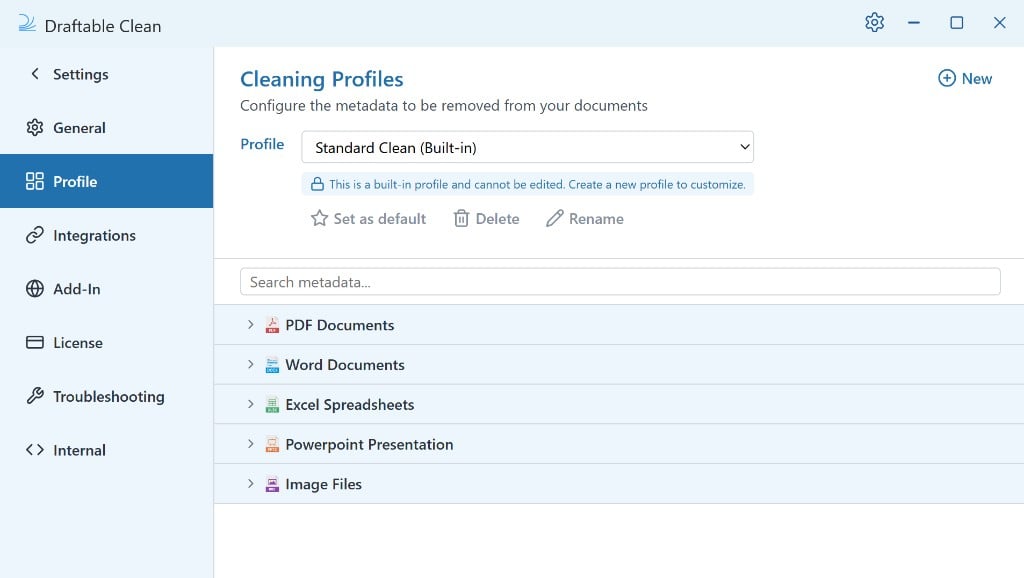
Where a metadata type supports Replace, you can specify a custom replacement value — for example, replacing individual author names with your firm name, or replacing document titles with a generic label.
Administrators can require specific metadata types to always be removed across every cleaning profile using the enforce must-clean metadata types policy. See Configuring preferences with Group Policy for details.