

Because no per-user telemetry is sent to Draftable, and a centralised administrator portal for license and usage monitoring does not exist for Draftable, the Windows Registry is the most reliable way for administrators to confirm whether this workstation (and account/user) is already activated. This article explains:
  • Where to look in the Registry for both per-user and machine-wide installs.
  • What each value means (activated vs not-yet-activated).
  • A ready-to-run PowerShell script that can audit one PC, or many PCs by reading those keys remotely.

How Draftable decides which key to read

When Draftable starts, it first checks the current user hive (HKCU).
If the required value is not present, it falls back to the machine-wide hive (HKLM).
Machine-wide note: all system-scope keys live under
HKLM\Software\Policies\Draftable rather than HKLM\Software\Draftable.

Registry locations and meanings

Installer scopeHive & pathValue nameMeaning
Per-user (Default EXE / MSI)HKCU\Software\Draftable\CompareActivatedProductKeyPresent ⇒ this profile is activated
Per-user (Default EXE / MSI)HKCU\Software\Draftable\CompareProductKeyPresent but ActivatedProductKey missing ⇒ user has not activated yet
Machine-wide MSIHKLM\Software\Policies\Draftable\CompareSame two value names as aboveSame meaning, but applies to all users on the device
Example screenshot of a user who has Draftable activated
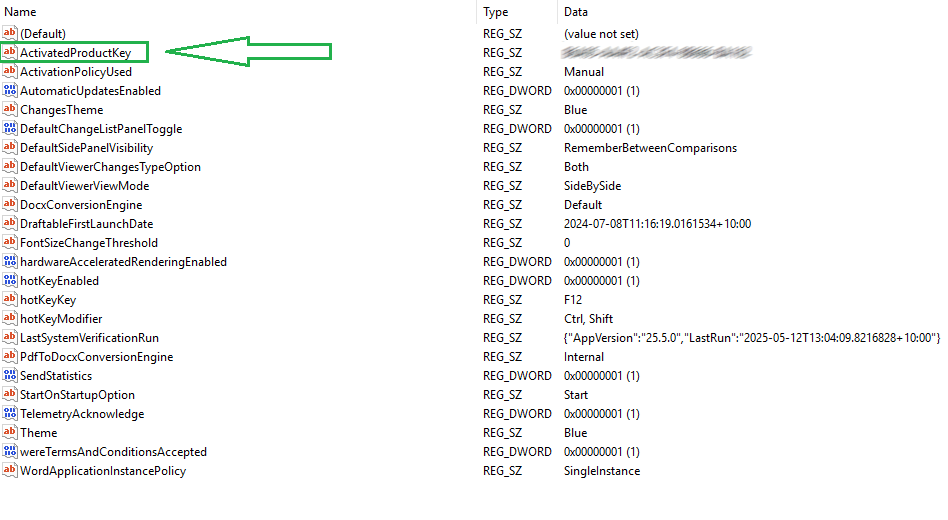
The ProductKey entry is also where administrators can pre-set a licence before first launch.

Manual, one-off check

1
Win + R → regedit
2
Browse to the relevant path from the table above.
3
Look for ActivatedProductKey (activated) or only ProductKey (not yet activated).

Automated audit with PowerShell

Save this as Check-DraftableActivation.ps1 and run it in an elevated PowerShell window.
It defaults to the local machine; add -ComputerName to scan remote PCs (requires the Remote Registry service).
<#
  Check-DraftableActivation.ps1
  Purpose: List Draftable licence status for one or more computers.
  Usage:
      .\Check-DraftableActivation.ps1               # local machine
      .\Check-DraftableActivation.ps1 -ComputerName PC01,PC02
#>

param(
    [string[]]$ComputerName = $env:COMPUTERNAME
)

function Get-DraftableStatus {
    param($Computer)

    # Open HKU (per-user hives) on the target
    $reg = [Microsoft.Win32.RegistryKey]::OpenRemoteBaseKey(
               [Microsoft.Win32.RegistryHive]::Users, $Computer)

    foreach ($sid in $reg.GetSubKeyNames()) {
        $sub = $reg.OpenSubKey("$sid\Software\Draftable\Compare")
        if (-not $sub) { continue }

        $activated = $sub.GetValue('ActivatedProductKey',$null)
        $pending   = $sub.GetValue('ProductKey',$null)

        [pscustomobject]@{
            Computer   = $Computer
            UserSID    = $sid
            Activated  = [bool]$activated
            ProductKey = $activated ?? $pending
        }
    }
}

$results = $ComputerName | ForEach-Object { Get-DraftableStatus $_ }
$results | Format-Table -AutoSize
What the script does
  • Enumerates each profile under HKU.
  • Reports Activated = True if ActivatedProductKey exists; otherwise False.
  • Works locally or remotely (requires network connectivity and permissions).
  • Pipe the last line to Export-Csv for a spreadsheet-friendly report:
$results | Export-Csv .\DraftableActivationAudit.csv -NoTypeInformation

Troubleshooting

SymptomLikely causeFix
No keys found for a userDraftable has never been launched under that profileAsk user to open Draftable once, or pre-seed a ProductKey
Neither HKCU nor HKLM keys existApp installed but never run, or incorrect installer pathVerify correct installer (per-user vs machine-wide)
Remote script returns access errorsRemote Registry service disabled or insufficient rightsStart the service or run with elevated domain credentials

Next steps or further questions?

  • Use the PowerShell script to audit your users’ activation status, and make changes to the code for easier automation where required.
  • Pair this check with Draftable’s Group Policy templates to automate licence rollout and other settings.
  • Still have questions? Contact support@draftable.com — centralised usage telemetry is on our roadmap and feedback is welcome.