

- Save time and reduce screen clutter with the single workspace window using tabs to consolidate new comparisons, progress bars, comparison views and the settings menu.
- Remove dependency on COM add-ins by using Draftable’s new JS Outlook add-in to compare attachments, email text, or run 1-Click Compare workflows
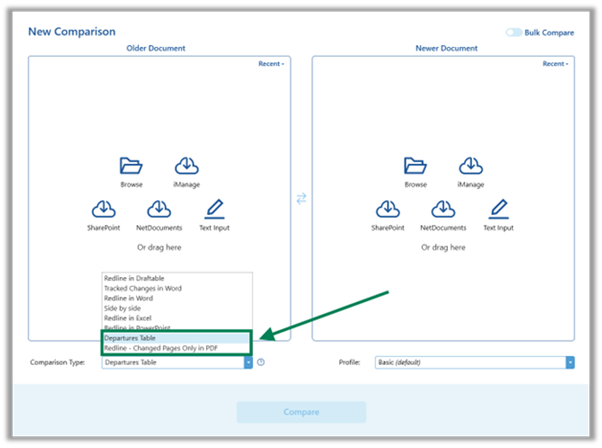
- Get to outputs faster by selecting Changes Pages Only (PDF) and Departures Table as Comparison Types without opening the Draftable Comparison Viewer.
- Improve comparison reliability with refined OCR handling and better detection of text in tables and shapes.
- Increase stability with fixes for long filenames, TXT-to-PDF wrapping, empty document handling, and more.
Core Functionality
Redesigned user interface
Running comparisons is faster, more intuitive, and less cluttered than ever with a redesigned interface. Draftable now sits within a single window with tabs, consolidating all previous windows (new comparison, progress bar, comparison viewer, settings) into a single view. Users can run multiple new comparisons at once by opening new ‘tabs’. When completed, comparisons are viewed inside of tabs making it easier to switch between multiple redlines. Taking design cues from modern web browsers, users will find the new experience familiar and easy to work with right out of the box. Specific changes included in the update are:- A single window now merges the New Comparison, Comparison Viewer, Settings, and Progress Bar.
- Tabbed comparisons replace multiple floating windows, reducing screen clutter.
- Users can start new comparisons in a new tab for faster multitasking (and run multiple single pair comparisons at once outside of ‘bulk compare mode’).
- Modern rounded corners and larger fonts/icons improve readability and navigation.
New comparison output options
Users can spend less time in unnecessary workflow steps (‘clicks’) by directly opening or exporting Changed Pages Only or Departures Table output types (previously only available via export from the viewer). This allows lawyers to review and share key documents more efficiently. Specific details of the output types and changes in v25.8.0 are below:- Changes Pages Only (PDF): This generates an output showing only the changed (redlined) pages. It is now available as a Comparison Type (when running a comparison), and in 1-Click Compare workflows and Bulk Compare mode.
-
Departures Table: This is an table document output showing each changed clause in a redline, with changes shown in the context of the whole clause text. It is now available directly from the Comparison Type menu and as a 1-Click Compare option.
Accuracy & Quality
Smarter OCR handling
Reviewing scanned or partially machine-readable documents is now much less hassle. Draftable’s Tungsten OmniPage OCR engine in now triggers more consistently in ‘auto’ mode when documents contain both digital text and scanned content. This means lawyers do not need to manually switch OCR mode to ‘always’ when comparing documents with scanned sections.Better recognition of structured elements
Complex documents with embedded tables and textboxes can now be reviewed with greater accuracy. Updates to the comparison algorithm ensure that content inside<w:pict> elements is correctly captured in the redline.
Improved comparison quality - less false positives
Reviews are now clearer and less cluttered, letting fee earners focus on substantive changes. New logic for mixed numbering and text detection minimizes unnecessary markups when documents contain structured numbering.Ease of Use
Users can now rely on Draftable to make smarter decisions about file order and layout preferences.Smart ordering for non-DMS input files (Preview Feature)
Non-DMS files are now automatically sorted into older/newer order based on metadata such as filenames (e.g. if including reference to version numbers) or file modification or creation dates. This reduces the need for file order switching when comparing non-DMS documents. The feature is currently released as a ‘Preview’ only. To access this feature contact your account representative or email product@draftable.com.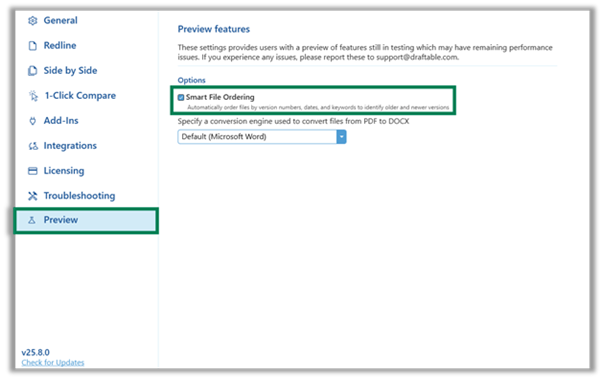
Remember Summary Panel view setting
The Viewer now remembers the expanded or collapsed state of the summary panel when switching between Redline and Three-Pane views. This removes a frustration from users when toggling between view settings.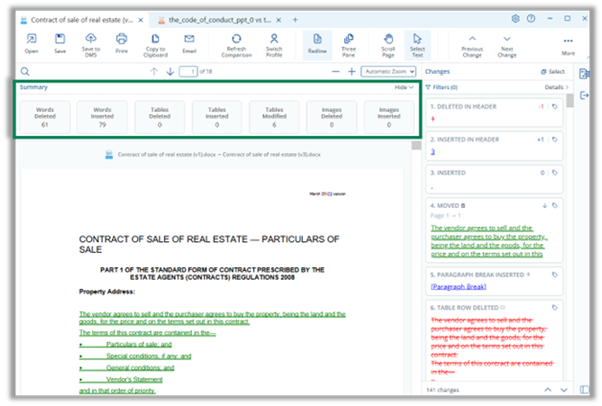
Integration Functions
Outlook
File loading, text loading and 1-Click Compare in modern JS add-in
Comparing documents directly from Outlook is now possible without VSTO / COM add in technology, reducing reliance on legacy components. The new Draftable JS Outlook add-in v1.1.21 (see here for update instructions) now supports file loading, text loading, and 1-Click commands. This means organizations will be able to remove the legacy Draftable Outlook COM add-in by upgrading to the Outlook JS add-in v1.1.21 or later. Note: Draftable is currently building more JS add ins for Word (coming next month), Excel and PowerPoint (by end of October) to remove dependency on COM technology.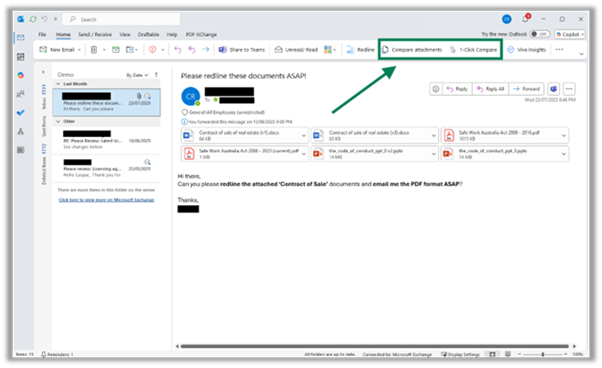
Redline in Email updates
The v1.1.21 Outlook add-in also updated Redline in Email functionality to:- Support improved image caching
- Fix an error when comparing edits to tables in emails
- Fix an error when list items contain breaks
- Update add-in name to “Draftable” from “Redline”
- Optimize long running compare tasks
iManage
iManage users can continue to rely on drag-and-drop workflows with support for the latest Drag & Drop API in the updated iManage SDK. This ensures compatibility with current and upcoming versions of iManage without disruption. For customers on-premise who may not yet have upgraded iManage, drag & drop in Draftable will remain backwards compatible.Epona
Teams using Epona gain greater control over how comparisons interact with subversions. A new option allows users to decide how Compare Latest processes sub-versioned files, providing flexibility in version management.Administrator Features
IT administrators can now diagnose issues more effectively with a new Troubleshooting setting. Enabling extra logging from CEF provides greater visibility into underlying processes when resolving errors.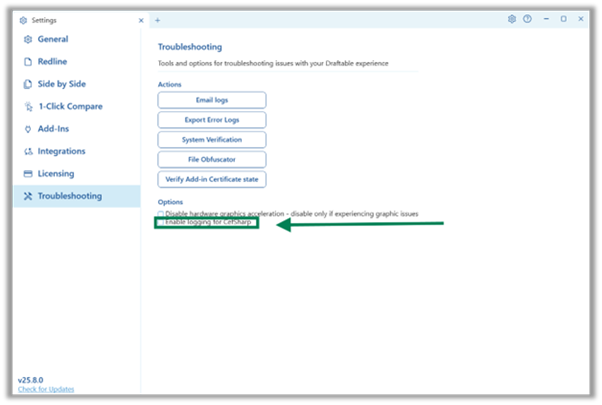
Bug Fixes
This release includes multiple fixes to improve reliability and stability:- Corrected text wrapping when converting .txt files to PDF.
- Fixed handling of invalid listnum fields.
- Resolved issue where NetDocsEchoPrefix registry value was not normalized, causing domain-profile paths to fail.
- Fixed Summary page style not updating when switching Viewer profiles.
- Corrected zip corruption caused by empty XML parts.
- Fixed issue when unhiding unchanged pages in the Viewer.
- Resolved “unknown error” when opening, saving, or emailing Excel PDF redlines.
- Fixed Word Add-in hanging when opening completely empty documents.
- Resolved Changes Report errors with long filenames.