

- Work faster with PDFs and short documents thanks to a new Preview Mode that speeds up comparisons for smaller files, and a new Draftable PDF to DOCX conversion engine for PDF input files
- Use Draftable in your native language with new support for 10 international languages in the interface
- Easily load files via drag and drop by resizing the new Draftable window to 1/4 of a laptop screen
- Clean up version lists in SharePoint by displaying only major versions when selecting files
- Enforce settings across filetypes with Group Policy for Profiles now supporting Excel and PowerPoint
Performance
Faster comparisons on shorter documents with new Preview setting
Draftable has always been optimized for comparing large, complex documents (30+ pages). Our comparison engine prepares all output formats (PDF, Redline in DOCX, Tracked Changes, side-by-side view) up front so you don’t have to rerun comparisons. But for shorter documents (1–30 pages), this upfront work can feel slower than necessary. With version 25.9.0, we introduced a new processing architecture called Worker Thread Mode, which is designed to speed up comparisons for short (up to 30 page) documents. This has been released as a Preview feature as it is stable for most cases, but may encounter edge-case errors. We’ll be finalizing its implementation across our product suite in early 2026. To access this preview setting, please contact your Account Executive or reach out directly to product@draftable.com.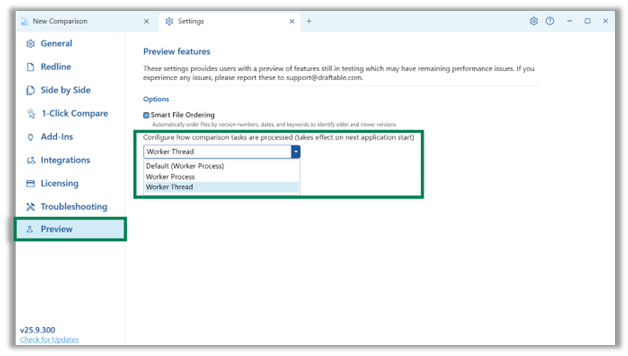
Improved speed and reliability of PDF comparisons
PDF files are often a source of frustration when running comparisons. They take longer to compare and are more likely to result in errors. The 25.9.300 update included a new “Draftable Engine” option for “PDF to DOCX conversion”. This new engine is faster and more reliable than the previous default Word engine, and should mean faster PDF comparisons with 25% less ‘unable to compare’ errors. This setting was previously available as a preview while we undertook quality assurance testing, but is now available to all users in the “General” settings tab. In some cases, users may notice this new Draftable Engine also improves layout preservation and text recognition in redline comparisons.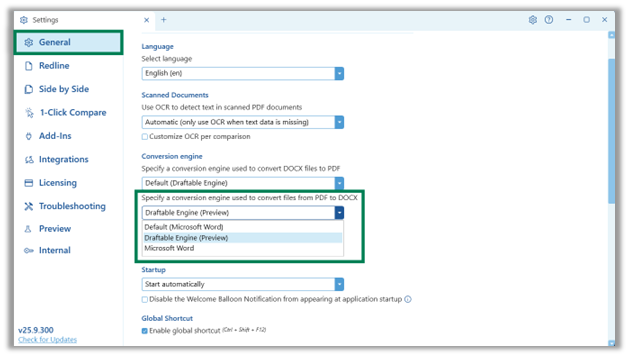
Smoother workflows for Redline in Email
Early feedback on our new Redline in Email add in showed that while lawyers are loving the ability to accept / reject changes, they were running into limits when trying to generate ‘clean’ emails to share with clients or external parties. Our “Redline in Email” outlook add in v1.1.23 update changed how we handle images in emails to reduce the likelihood of seeing popups limiting new ‘clean’ email creation. This change improves reliability when sharing comparisons directly from Draftable.Ease of Use
Use Draftable in your language of choice
Firms operating in multilingual regions can now use Draftable Legal in their preferred language. The user interface now supports French, German, Spanish, Portuguese, Swedish, Dutch, Japanese, Polish & Tagalog. Language settings can be adjusted via the General tab in Settings.The language for all Draftable Add Ins remains English. Support for foreign language in Draftable Add-ins will be added in future updates.
Enhanced window resizing for drag and drop
After feedback on the user interface design changes in our 25.8.0 release, we have updated Draftable support a smaller minimum window resizing. This allows users to snap Draftable into a quarter-screen view and is ideal for drag and drop workflows on laptops or smaller monitors. We also fixed a bug fix in v25.9.300 to ensure Draftable remembers the last window size, meaning users should not need to adjust the window sizing each time they launch Draftable.Integration Functions
SharePoint: Show only major versions
A new setting allows customers using SharePoint to filter out minor versions when browsing document history. This helps users avoid clutter and reduces the risk of accidentally comparing or saving to an unintended version.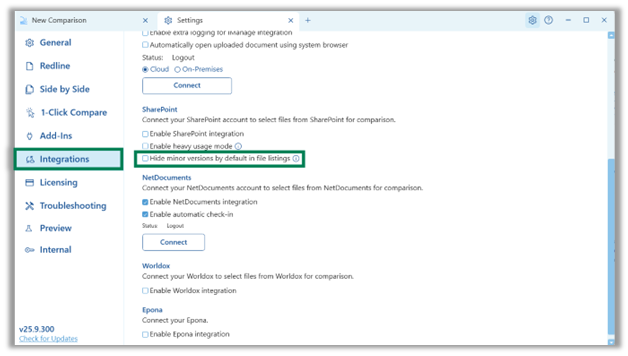
SharePoint: search and performance improvements
Search operations in SharePoint have been optimized to deliver results more quickly especially in large libraries or when selecting files via the new file picker interface.Administrator Features
Lock profile settings across Office formats
Administrators can now enforce redline profile settings across Word, Excel, and PowerPoint by locking configurations via Group Policy or Windows Registry. This improves consistency across file types and helps firms standardize output formatting across file types.New telemetry data for file sources and window sizing
Two new telemetry settings have been added to improve visibility into user workflows and assist with product improvements:- Source of loaded files (e.g. Local, DMS, SharePoint)
- User window resizing actions
Bug Fixes
- Fixed “Compare with Latest” command appearing on local files instead of only DMS-managed files
- Resolved SharePoint ‘Compare with Latest’ path issue affecting NetDocuments domain-profile folders
- Fixed bug where more than 5 files emailed from Draftable would trigger an error
- Corrected installation issue for Draftable Excel Add-in via MSI
- Fixed issues with file selection in iManage via Word Add-in
- Multiple fixes for “unable to compare” errors caused by document-specific edge cases
- Fixed layout issue when resizing the comparison tab
- Cleaned up Normal.dotm context menu entries to eliminate unnecessary prompts
- Fixed tab detachment issue breaking original window workflow
- Fixed text decoration settings not clearing correctly
- Corrected classification issues in table edits and moved text alignment
- Fixed false positives in numbered lists caused by bookmarks interfering with the revision acceptor
- Fixed Word Add-in parsing errors for files containing ampersands (&)
- Fixed failure to compare when encountering invalid Unicode codepoints
- Fixed telemetry logging issue where original file type was not captured